
CZP-1 Synthesizer Manual
1. Introduction
The CZP-1 ( Link )is an in browser phase distortion synthesizer capable of producing a range of interesting sounds. It has two lines, each consisting of a digitally generated oscillator, a pitch envelope, a DCW envelope for phase distortion, and a DCA envelope for amplitude, which feeds into a mixer allowing for line selection and different mixing modes including ring modulation and stereo separation.
2. Quick start
- Ensure your device volume is set to an audible level and that it is not in silent mode then press Power in the Master panel.
- Use the on screen keyboard or your computer keyboard to play some notes. (It is also controllable via MIDI - see MIDI section).
- Select a sound in the Program menu. The Factory Presets bank is selected by default when you first boot.
- Master Volume adjusts the audio output level of the synthesizer.
- Press Panic if you need to silence all active sounds.
3. Library
The Library is a store for banks of programs. The Bank menu selects the current bank, and the Program menu selects a program in that bank. When you select a non empty slot this causes the parameters of the synthesizer to be set according to the selected program.
A bank consists of 128 program slots. A program is the saved set of parameters for a synthesizer sound.
The Factory Presets and Shared banks cannot be overwritten, while the other banks are available for use by the user. Such user banks contain programs created or imported by the user.
All 128 slots are listed in the Bank and Program menus, including empty slots.
The browser saves user banks and the last selected bank and program. Banks and programs are shared between instances of the CZP-1 in the same browser. (This is stored locally).
Bank controls
- New Bank creates a new empty bank with the provided name in the selected slot.
- Load Bank from a JSON file into the selected bank slot.
- Rename the selected bank.
- Save Bank as a JSON file.
- Unload removes a user bank.
Program controls
- Save saves the current synthesizer parameters in the selected program slot.
- Revert reverts the live editing state to the currently saved parameters in the selected program slot.
- Copy Program copies the synthesizer parameters of the live editing state to the clipboard.
- Paste Program pastes the synthesizer parameters from the clipboard on to the live editing state.
- Rename rename the selected program.
- Delete deletes the selected program leaving an empty slot.
- Share URL copies a URL that encodes the current program to the clipboard. See Sharing programs.
Editing parameters changes only the live parameters of the synthesizer. An asterisk indicates where parameters have been modified. The Copy and Paste actions on a panel only copy and paste on that panel. You can copy and paste between different panels of the same type, such as between the two Tuning panels or between any envelope panels. The Copy Program and Paste Program buttons in Library affect the complete set of synthesizer parameters.
Master Volume, the Master panel’s Tuning (semi) and Tuning (cents) controls, Keyboard, and MIDI options are not included in the saved program data.
Sharing programs
Share URL creates an URL containing the current live program, including unsaved edits, and copies it to the clipboard.
The URL encodes the program data, no data is stored remotely. The URL can be freely shared with other people.
Opening a shared URL in a browser decodes the synthesizer parameters and loads it into the uneditable Shared bank at slot 127. The Shared program becomes the current program and replaces any previous Shared program.
To save a received program in a user bank select the program in the Shared bank and press Copy Program in the Library. Select a user bank and program slot then press Paste Program. Press Save to write the pasted program to the selected slot.
If you want to send more than one program use Save Bank to download the bank as a JSON file. Someone else can then use Load Bank to import the JSON file into a bank slot. This is also how you might share bank data on a website by allowing people to download json data of a bank you have created.
4. Master
The Master panel contains the master audio controls and global pitch controls.
- Power starts and stops the synthesizer.
- Panic immediately silences all voices.
- Master Volume sets the synthesizer audio output level from 0 to 1.
- Tuning (semi) changes pitch by -24 to +24 semitones. Tuning (cents) changes pitch by -50 to +50 cents.
Keyboard
The Keyboard panel contains an on screen keyboard and options for computer keyboard control.
- Octave down/up move the octave offset for the keyboard.
- When enabled, Slide lets you drag across the on screen keyboard, changing the current note as you cross each key without retriggering the voice when possible. This works well when combined with Portamento to glide between notes.
- Velocity controls the velocity used by the keyboard.
- Layout changes the layout of the computer keyboard.
5. Synthesis
The CZP-1 implements phase distortion synthesis, which was invented by Casio in the early 1980s and used in their CZ series of synthesizers.
Program structure
The complete set of parameters for two “lines”, and a few other functional blocks, form a program. A line is a DCO, a DCO pitch envelope, a DCW envelope, and a DCA envelope. The parameters for the other blocks are Line Select, Line Mix, Pan, Polyphony, Vibrato, Pitch Bend, Portamento, and Velocity Sensitivity.
The two lines
A line is a complete synthesis path that produces a signal. The CZP-1 has two lines, and each line is formed from a DCO (Digitally Controlled Oscillator) with external tuning parameters, a DCO pitch envelope, a DCW (Digitally Controlled Waveform) envelope, a Window function and a DCA (Digitally Controlled Amplifier) envelope. The two line outputs are passed to Line Select and Line Mix which can be set to combine the outputs of the lines in different ways. Programs can use one or both lines at once.
The DCO pitch envelope outputs a changing pitch offset which is fed into the DCO alongside the pitch derived from the note and effects such as pitch bend and portamento. The DCO outputs a repeating oscillator phase.
The DCW stage receives the DCO phase and the DCW envelope output and changes the mapping from oscillator phase to waveform position. At DCW Level 0 the non flat waveform options produce the same sine wave. When DCW Level is set to 99 the selected waveform produces its characteristic shape due to the applied phase distortion. The flat waveform is a special constant output. At high pitches the synthesizer limits the effective DCW level to reduce aliasing.
The Window function receives the oscillator phase and outputs a multiplier. The DCA stage applies amplitude gain to the windowed waveform sample. The DCA envelope outputs a changing amplitude value that is converted to the DCA gain.
The oscillator phase, selected waveform, and DCW amount feed into the waveform lookup. The lookup reads a waveform sample at the position selected by the phase distortion mapping. The Window multiplier is applied to that sample. The DCA gain is then applied to produce the line output.
Editing the synthesizer parameters
Line Mix
Select determines which lines are used. Mode determines how both line signals are combined.
Select
The Both (1+2’) selection sends Line 1 and Line 2 independently. The Unison (1+1’) selection sends two copies of Line 1, with the second using Line 2’s Tuning and Velocity Sensitivity settings, but copies all other synthesizer parameters from Line 1. Line 1 only and Line 2 only send only the selected line.
Mode
- Mix averages the two line signals.
- Ring applies ring modulation. It multiplies Line 1 by Line 2 and adds the product to Line 1.
- Noise adds a random 0 or +32 semitone offset to Line 2’s pitch, changing it every 0.2 milliseconds, then averages the two lines.
- Stereo sends the two lines to opposite sides of the stereo field with Pan used to set the position of Line 1 and Line 2 sent to the mirrored position.
Pan
Pan controls the level of separation between the two lines in Stereo mode. When Pan is 0 it is equivalent to Mix.
Tuning panels
Each line has a Tuning panel above its DCO panel. Tuning (semi) changes the line’s pitch in semitones. Tuning (cents) changes it in cents.
The Copy, Paste and Revert actions in a Tuning panel affect only its tuning values. You can copy tuning values from either Tuning panel and paste them into the other.
DCO panels
A DCO generates the line’s waveform and phase, controlled with the parameters in the DCO panel.
Waveforms
Each DCO provides two waveform option rows. The first row selects the primary waveform, and the second row selects the optional alternate waveform. Both rows have the same eight waveform options.
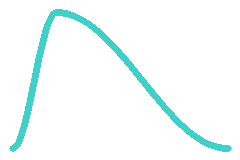
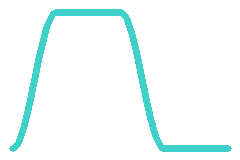
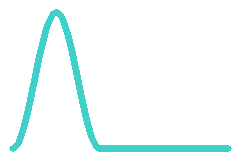

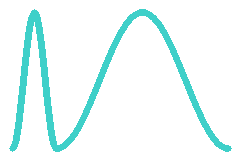
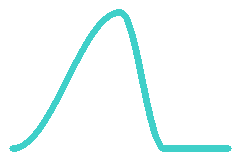
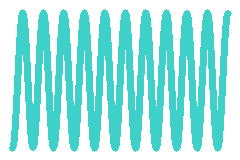
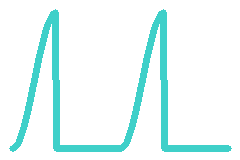
Alternating waveform?
Enable Alternating waveform? to alternate between the waveform selected in the first row and the waveform selected in the second row. The first cycle after a note retriggers uses the first waveform.
Window function
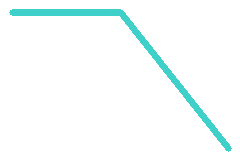
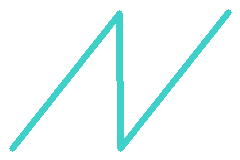
A Window function follows the oscillator phase through one complete waveform period. It multiplies each waveform sample by the window value at that phase position, then restarts at the beginning of the next period.
- None leaves the waveform sample unchanged.



Octave
Octave shifts the pitch by -1, 0, +1, or +2 octaves.
Envelope panels
An envelope is a value that changes over time. Each line has a DCO pitch envelope, a DCW envelope, and a DCA envelope. Each envelope has eight stages.
The Copy button copies the current envelope panel’s settings. The Paste button applies copied envelope settings to the current panel. You can copy settings from any envelope panel and paste them into another.
Each stage has a Level and a Rate.
- Level sets the value for the selected envelope. In a DCO pitch envelope it sets the pitch offset, in a DCW envelope it sets the phase distortion amount, and in a DCA envelope it sets the amplitude.
- Sustain selects the stage held while the note is held.
- End selects the stage used when a note is released before the Sustain stage is reached.
- Rate sets how quickly the current value moves towards the level set for that stage. Higher values move towards the level faster. The displayed time is the resulting duration of the stage. It depends on the Rate and the distance from the value at the start of the stage to the target Level. Stage 0 starts from the envelope’s resting value. When two stages have the same level the Rate between them has no effect. DCO, DCW, and DCA envelopes each have different formula for interpreting the rate setting, which is accounted for when calculating the displayed time values.
- Keyboard tracking adjusts the envelope rate according to note pitch. 0 has no effect and 1 applies the full tracking amount.
If the note is released after the Sustain stage is reached, the envelope continues from the stage after Sustain. If the note is released before the Sustain stage is reached, the envelope jumps to the End stage. If Sustain is off, the envelope continues through its stages. A DCA stage with Level 0 has zero amplitude at its target.
Other parameters
Polyphony
Polyphony is how many voices can sound at once.
Mono uses one voice. In this mode triggering additional notes while holding a note will move the pitch to the newly played note without restarting the envelopes.
Vibrato
Vibrato is periodic pitch modulation.
- Rate sets speed in Hz.
- Depth sets the peak vibrato deviation in semitones.
- Mod Depth sets the additional peak deviation at full mod wheel position.
- Delay sets the time in seconds before vibrato starts.
The vibrato waveform is selected from one of the following four options:



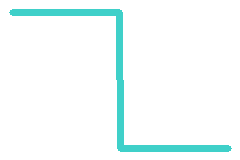
Changing the value of the mod wheel causes a maximum of Mod Depth to be added to Depth .
Pitch Bend
Pitch Bend is continuous pitch control from the pitch bend wheel or MIDI input.
Range sets the maximum pitch bend in semitones.
Portamento
Portamento is a glide between pitches.
- Enable turns portamento on.
- Time sets the time for a twelve semitone glide. The glide speed is 12 semitones divided by Time. A Time value of 0 produces no glide.
- Portamento glides between legato notes in Mono mode. Legato note changes retain the current envelope stages.
Velocity Sensitivity
Velocity Sensitivity determines how note velocity affects the synthesis parameters.
Amount sets the strength of velocity response. At zero, velocity has no effect. At full amount, the selected response follows note velocity.
- DCA 1 and DCA 2 apply velocity to the amplitude levels.
- DCW 1 and DCW 2 apply velocity to the phase distortion levels.
6. MIDI
MIDI allows you to connect the synthesizer to external MIDI controllers and devices. Not all browsers support it, and those that do will probably ask for permission which must be granted.
To activate MIDI ensure Enable is selected. MIDI initially shows as “off” but the status will change to reflect availability. In the event the browser does not allow MIDI a message will be displayed.
- Local Control determines whether the on screen keyboard, computer keyboard, and wheels control the CZP-1. It is useful to be able to disable this when external equipment or software echoes the MIDI messages sent by those controls back to the CZP-1. The CZP-1 then responds to the returned MIDI messages without also responding directly to the original controls.
- Input Port the port the synthesizer listens on.
- Output Port the port for MIDI output of notes, controllers, and program and bank change messages.
- Channel the MIDI channel used for input and output.
The synthesizer handles Note On, Note Off, Pitch Bend, CC 1 Mod Wheel, CC 7 Channel Volume, CC 11 Expression, CC 64 Sustain, CC 120 All Sound Off, CC 121 Reset All Controllers, CC 123 All Notes Off, Bank Select MSB, and Program Change.
CC 7 controls Master Volume. CC 11 controls expression, scaling the amplitude and DCW responses enabled by Velocity Sensitivity.
CC 64 holds released notes until the sustain pedal is released. CC 120 silences all voices and releases notes sent to external MIDI equipment. CC 121 resets the controllers. CC 123 releases all active notes for the selected MIDI channel.
7. Copyright
Most of the icons are from the Lucide project https://lucide.dev with the license at https://lucide.dev/license .